
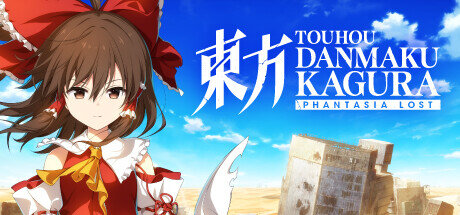
Touhou Danmaku Kagura Phantasia Lost
- Platform
- PC
- Release Date
- File Size
- 120.6 MB
- Views
- 819
- Comments
- 2
- Languages
- English
- Added by
- Added by Admin
Version Status
- Current Version
- v1.16.0 + all DLC
Game trailer: Touhou Danmaku Kagura Phantasia Lost
Screenshots


Description
Touhou Danmaku Kagura Phantasia Lost is a rhythm game that builds on the foundation of its predecessor. There are two different rhythm games to play through: a traditional one and an innovative one. In Kagura, players test their finger tapping skills by hitting six tracks in succession. Combinations accumulate with each successful click, resulting in high scores. This mode features more than 160 popular arrangements across four difficulty levels, providing a challenge for both beginners and seasoned rhythm veterans. Danmaku throws traditional rhythm gameplay out the window, combining shoot em up elements with traditional note hitting. Players strategically press notes on the sides to unleash powerful attacks against bosses. Each stage includes unique missions that require strategic thinking and execution to achieve victory. Phantasia Lost expands its music library beyond the original soundtrack, offering a total of 68 diverse tracks.
NOTE. Uploaded version: 10 February 2026 [v1.13.1] + Update v1.14.2. This is Full release and latest version of game. The game is already Packaged in ISO File and ready to run the game after install, read the instruction below.
The following DLCs are included:
- Touhou Danmaku Kagura Phantasia Lost — Toby Fox & ZUN «U.N. Owen Was Hero?»
- Touhou Danmaku Kagura Phantasia Lost — Extra Song Pack 1
- Touhou Danmaku Kagura Phantasia Lost — Extra Song Pack 2
- Touhou Danmaku Kagura Phantasia Lost — Extra Song Pack 3
- Touhou Danmaku Kagura Phantasia Lost — Extra Song Pack 4
- Touhou Danmaku Kagura Phantasia Lost — Artbook
- Touhou Danmaku Kagura Phantasia Lost — Unlock All Songs
- Touhou Danmaku Kagura Phantasia Lost — Touhou Mystia’s Izakaya Collab «Beneath the Purple Cherry Blossoms Once Again»
- Touhou Danmaku Kagura Phantasia Lost — Extra Song Pack 5
- Touhou Danmaku Kagura Phantasia Lost — Extra Song Pack Vol. 6
- Touhou Danmaku Kagura Phantasia Lost — Extra Song Pack Vol. 7
- Touhou Danmaku Kagura Phantasia Lost — Extra Song Pack Vol. 8
- Touhou Danmaku Kagura Phantasia Lost — Extra Song Pack Vol. 9
- Touhou Danmaku Kagura Phantasia Lost — Extra Song Pack Vol. 10
- Touhou Danmaku Kagura Phantasia Lost — Extra Song Pack Vol. 11
- Touhou Danmaku Kagura Phantasia Lost — Extra Song Pack Vol. 12
- Touhou Danmaku Kagura Phantasia Lost — Extra Song Pack Vol. 13
- Touhou Danmaku Kagura Phantasia Lost — Extra Song Pack Vol. 14
- Touhou Danmaku Kagura Phantasia Lost — Soundtrack
Four planned DLC Music Packs promise to further expand the music selection, bringing it to a staggering 102 tracks. Additionally, free DLC is on the horizon, the first of which will be released alongside the game and will include the iconic collaboration song «U.N. Owen Was Hero?» Toby Fox and ZUN. The narrative revolves around Reimu’s quest to collect memory fragments known as Mitama Cards, needed to restore the lost land of Fantasia. With the help of Danmaku Kagura, she tries to uncover the truth behind the reasons for her destruction. Meanwhile, Marisa goes on her own parallel journey, leaving the question of their possible meeting hanging in the air. Whether you’re a seasoned fan of the series or a rhythm game enthusiast looking for a new experience, Touhou Danmaku Kagura Phantasia Lost offers an exciting combination of rhythmic gameplay, varied music.
System Requirements
Minimum
- OS:
- Windows® 10 (64-bit )
- Processor:
- Intel Core i 5-6400
- RAM:
- 4 GB RAM
- Graphics:
- Intel HD Graphics 530
- Storage:
- 10 GB available space
- DirectX:
- Version 11
- Network:
- Broadband Internet connection
Installation Guide
Step-by-step setup process for TENOKE
-
Mount the .iso image — Windows 10/11 mounts it from the right-click menu, otherwise use Daemon Tools or a similar tool.
-
Run
setup.exefrom the disc and install the game — Tenoke builds are already cracked, installation is all it takes. -
If the disc contains a
Tenokefolder, copy its contents into the installed game directory. -
Launch the game from the desktop shortcut (as administrator).
Game Info
- Developer
- UnknownX
- Publisher
- Alliance Arts
- Platform
- PC
- Release Date
- File Size
- 120.6 MB
- Status
- Scene (ISO)
Update Available
v1.14.2Upgrade to v1.14.2 without re-downloading the full game
TENOKE
-
Base download v1.13.1
You get this version with the full game download below
How to apply this update
-
Download the update archive from the links in this section — it is much smaller than the full game, so the download will be quick.
-
Extract the archive (RAR/ZIP) with WinRAR or 7-Zip to a short, Latin-only path like
C:\Games\GameName. -
Run
setup.exeinside the update folder and install the update into your existing game folder — the one that already holds the installed game. Do not install into a new folder. -
Copy the updated files included with the release and confirm replacement when prompted, then launch the game and check the new version in its main menu.
Download Game
The download below is the base version v1.13.1. To reach v1.14.2, apply the updates in the chain above.
Full game 3
829ff7aaca156bcf4326c396073f421f
1efb5f4ae2d2c9c6a32509532b0435e2bc7e065c723de692526065eddb336d13
Checksums verify the integrity of this specific file. They are not an absolute malware guarantee — always scan downloaded files.
Torrent file ready
Reviews
No written reviews for this game yet.
Rate this repack in the form below and your comment becomes the first review here.





Comments (2)
v1.6.1 Update The latest update has been released today!For details, please check the patch notes here: Touhou Danmaku Kagura Phantasia Lost Event2025å¹´2月12日周三Update Patch v1.6.1Steam Version v1.6.1 Update Released The following additions and fixes have been implemented in this update: Two new arranges, Toby Fox’s “Necrolovania†& ZUN’s “Megalovania of... Favorite feature for heroines & Mitama cards have been added and you can now play with your favorite characters in Free Mode!You can now track your gameplay progress and achievements with Play Stats.Full Combo Flash and other additional features have been added as well.Additionally, Song Pack Vol. 6, released on the same day, introduces the first-ever Beat Map Level 30! The highest difficulty level, \"X\", has long reigned at the top of DanKagu. However, we\'ve received feedback from players who wish to challenge it but find it overwhelmingly difficult.As a stepping stone toward X-level mastery, we have created a new Level 30 difficulty for players looking to refine their rhythm game skills!Whether you\'re aiming to master rhythm games or want to focus on enjoying the music, we have updates planned to keep DanKagu fun for everyone. Please look forward to future developments! Thank you to everyone who participated in the \"『Maiden\'s Capriccio ~ Dream Battleã€Song Jacket Illustration Contest,\" which was open for submissions until January 27th!The Unknown X team is carefully reviewing all submissions, and we will announce the results soon. Please stay tuned!
Steam patch v1.3.2 has been released.■New ImplementationsAdded the opening theme song “Farewell Tour” from the Touhou derivative anime “Hifuu Club Activity Record.”Added a layout selection dialog when starting a new game.Added a collaboration songs folder to the Free Mode song selection screen.■FixesFixed an issue where the bar lines were misaligned with the center of the notes in certain songs.Hitotsuyogari no TouhikouAkeboshi RocketDanzai ha Amaneku Ningen no MotoniHelp me, ERINNNNNN!!Museimei SurfaceFixed an issue where the cursor didn’t move correctly in the Danmaku Stage confirmation dialogue.Adjusted the volume of sound effects, such as the one that plays when pressing CONTINUE on the title screen, as they were too loud.