
The Battle of Sacred Heart
- Platform
- PC
- Release Date
- File Size
- 9.48 GB
- Views
- 6,686
- Comments
- 0
- Languages
- English, Japanese, Simplified Chinese, Traditional Chinese
- Added by
- Added by Admin
Game trailer: The Battle of Sacred Heart
Screenshots


Description
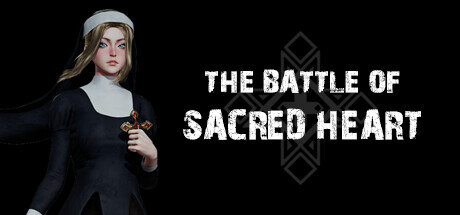
The Battle of Sacred Heart is an indie action game developed by 40RS that will take players into a medieval world of protracted wars. Set against a backdrop of chaos and demonic invasion, players will face relentless waves of powerful enemies that continually push them to their limits. The game features a unique skill system that allows you to unlock and customize up to 24 different abilities, creating your own unique fighting style. At critical moments, players can use devastating apex abilities to turn the tide of battle. Adding depth to the gameplay is that players can choose from four different companions, each with unique attributes, to accompany them on the battlefield. As the conflict escalates, players will have to confront four legions of demons and unexpected monsters, creating a challenging and fast-paced survival experience.
System Requirements
Minimum
- OS:
- windows10
- Processor:
- INTEL CORE I5-8400 or AMD RYZEN 3 3300X
- RAM:
- 12 GB RAM
- Graphics:
- NVIDIA GEFORCE GTX 1060 3 GB or AMD RADEON RX 580 4 GB
- Storage:
- 10 GB available space
- DirectX:
- Version 12
- Sound Card:
- Windows Compatible Audio Device
Recommended
- OS:
- Windows 10
- Processor:
- INTEL CORE I7-8700K or AMD RYZEN 5 3600X
- RAM:
- 16 GB RAM
- Graphics:
- NVIDIA GEFORCE GTX2060 8 GB or AMD Radeo RX 6600 8 GB
- Storage:
- 10 GB available space
- DirectX:
- Version 12
- Sound Card:
- Windows Compatible Audio Device
Installation Guide
Step-by-step setup process for TENOKE
-
Mount the .iso image — Windows 10/11 mounts it from the right-click menu, otherwise use Daemon Tools or a similar tool.
-
Run
setup.exefrom the disc and install the game — Tenoke builds are already cracked, installation is all it takes. -
If the disc contains a
Tenokefolder, copy its contents into the installed game directory. -
Launch the game from the desktop shortcut (as administrator).
Game Info
Download Game
Full game
f9ddae3c0d20e436dcfaa0cb81db7523
85a6f65cd699f92957b20c515d995985cacf35e489e14f0c1ddb3102d6af3878
Checksums verify the integrity of this specific file. They are not an absolute malware guarantee — always scan downloaded files.
Torrent file ready
Reviews
No written reviews for this game yet.
Rate this repack in the form below and your comment becomes the first review here.



Comments (0)
No comments yet. Be the first to leave one!