
Machine Mind
- Platform
- PC
- Release Date
- File Size
- 680 MB
- Views
- 3,058
- Patch Notes
- 1
- Comments
- 2
- Languages
- English, Russian, French, Italian, German, Spanish - Spain, Japanese, Portuguese - Brazil, Simplified Chinese, Korean
- Added by


Version Status
- Current Version
- v1.1.4
- Current Build
- 26075502
- Latest Build
- 26075502
- Last Steam Update
- Machine Mind Soundtrack
- Machine Mind Digital Artbook
Game trailer: Machine Mind
Screenshots


Description
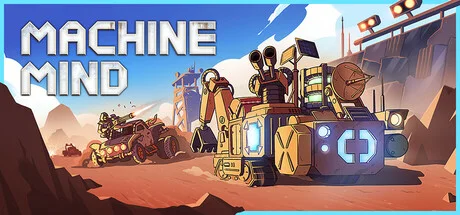
Machine Mind is a post-apocalyptic action strategy game where you play as a human consciousness trapped in a robotic shell after the nuclear devastation of Earth. After a mysterious virus wiped out humanity, survivors fled to orbital stations while crazed raiders took over the wasteland below. A crashed ship leaves you stranded with your mind intact and a set of rovers to manage.
The core gameplay revolves around creating and customizing rovers for various purposes - resource mining, base building and fighting enemies. You will collect materials to create weapons, modules and equipment, fortifying your position against constant threats. The game combines base building with tactical combat: you fight gangs of raiders and powerful bosses using advanced weaponry.
Resource management plays an important role as you assign specific roles to your fleet, balancing resource gathering operations, construction projects and defensive duties. Environmental hazards such as sandstorms and radiation zones add another layer of difficulty to survival. Explore a variety of locations, including wastelands and abandoned factories, each of which hides valuable resources, dangerous enemies and plot secrets. Your ultimate goal is to re-establish communication with the orbital station and unravel the mystery of the disaster that destroyed civilization.
System Requirements
Minimum
- Processor:
- 2.0 Ghz Intel Pentium-4 / AMD Athlon II
- RAM:
- 1 GB RAM
- Graphics:
- 256 MB NVidia / AMD Radeon / Intel (HD 3000, HD 4000) with support for Pixel Shader 3.0 (AMD Radeon X1000 not supported)
- Storage:
- 1 GB available space
Recommended
- Processor:
- 2.3 Ghz Intel Core 2 Duo / AMD Athlon64 X2 or better
- RAM:
- 2 GB RAM
- Graphics:
- 512 MB NVidia GeForce 650 / AMD Radeon HD 5750 / Intel HD 4000 and newer
- Storage:
- 1 GB available space
Installation Guide
Step-by-step setup process for TENOKE
-
Mount the .iso image — Windows 10/11 mounts it from the right-click menu, otherwise use Daemon Tools or a similar tool.
-
Run
setup.exefrom the disc and install the game — Tenoke builds are already cracked, installation is all it takes. -
If the disc contains a
Tenokefolder, copy its contents into the installed game directory. -
Launch the game from the desktop shortcut (as administrator).
Game Info
- Developer
- Chudo-Yudo Games
- Publisher
- Targem Games
- Platform
- PC
- Release Date
- File Size
- 680 MB
- Status
- Scene (ISO)
Update Available
v1.1.4Upgrade to v1.1.4 without re-downloading the full game
TENOKE
-
Base download v0.7.2
You get this version with the full game download below
-
v1.1.0 Not available yet
-
v1.1.2 Not available yet
-
v1.1.4 71.3 MB
The update chain is incomplete: the following required releases are not available on this page yet — v1.1.0, v1.1.2. Install only the updates listed above, or wait until the full game download is updated.
How to apply this update
-
Download the update archive from the links in this section — it is much smaller than the full game, so the download will be quick.
-
Extract the archive (RAR/ZIP) with WinRAR or 7-Zip to a short, Latin-only path like
C:\Games\GameName. -
Run
setup.exeinside the update folder and install the update into your existing game folder — the one that already holds the installed game. Do not install into a new folder. -
Copy the updated files included with the release and confirm replacement when prompted, then launch the game and check the new version in its main menu.
Download Game
The download below is the base version v0.7.2. To reach v1.1.4, apply the updates in the chain above.
Full game 6
8ed7d53801892ca8be4976b79a50216e
088ac43f55973320432f04db65e4af6eb1b9dea6bfcad3fae6a6f23b6e961b13
Checksums verify the integrity of this specific file. They are not an absolute malware guarantee — always scan downloaded files.
Torrent file ready
Patch Notes
Official changelists for the builds of this game
Update 1.1.4
Build 26075502
Update 1.1.4
Build 26075502Reviews
No written reviews for this game yet.
Rate this repack in the form below and your comment becomes the first review here.





Comments (2)
1. After the death of the rover, it was impossible to interact with platforms and modules on another rover.
2. An invisible wall appeared in the doorway if a bot passed through there.
3. Korean was missing
4. In the TAB menu in the legend of the map there is a shield generator, which is not in the game.
5. By default, upscaling was enabled if you did not go into the settings.
6. Added the Share your feedback button to the menu