
Outerverse
- Platform
- PC
- Release Date
- File Size
- 1.76 GB
- Views
- 1,717
- Comments
- 0
- Languages
- English, French, German, Spanish - Spain
- Added by
- Added by Admin
Game trailer: Outerverse
Screenshots


Description
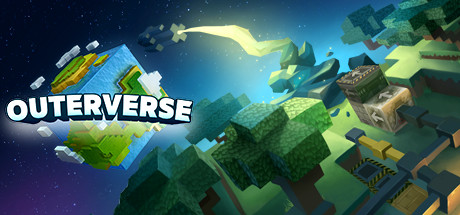
Outerverse is an adventure game with elements of automation based on quests. Create machines and weapons, then use them to travel the universe, defeat massive titans and develop your technology while experiencing space events. Here we find ourselves in a universe made up entirely of cubic objects, almost like Minecraft. Combining cubes of the required types, you can create automated objects, as well as weapons that can defeat big bosses. Our task is to destroy the six titans that threaten the existence of the universe. And each of them requires a special strategy. For example, Wood Titanium is vulnerable to fireballs, and effective anti-Stone Titanium missiles.
About This Game
At first glance, all this is difficult and incomprehensible, but the game helps us through a system of quests to first learn the basics of combining cubes, and then we move on to creating complex devices. Outerverse has two modes for those who tend to trust the mechanisms, and for those who like to craft from almost 100 different materials by hand. Combining blocks, we can create such complex objects as farms, factories, teleports. Outerverse voxel action-RPG-sandbox with elements of strategy and simulator, where you will find large-scale worlds, crafting, huge bosses, building automated factories and traveling between planets. You have to survive, build, explore and fight in a huge cubic universe.
System Requirements
Minimum
- OS:
- Windows 10 or higher
- Processor:
- Intel Core i5 3550 @ 3.3 GHz or AMD FX-6300
- RAM:
- 6 GB RAM
- Graphics:
- AMD Radeon R7 370 or NVIDIA GeForce GTX 660/570
- Storage:
- 4 GB available space
- DirectX:
- Version 11
Recommended
- OS:
- Windows 10 or higher
- Processor:
- Intel Core i5 3550 @ 3.3 GHz or AMD FX-6300
- RAM:
- 6 GB RAM
- Graphics:
- AMD Radeon R7 370 or NVIDIA GeForce GTX 660/570
- Storage:
- 4 GB available space
- DirectX:
- Version 11
Installation Guide
Step-by-step setup process for P2P Release
-
No installation is needed — this release is fully pre-installed and ready to play, so you can skip setup wizards and long updates entirely.
-
Extract the archive (RAR/ZIP) to a short, Latin-only path like
C:\Games\GameNameusing WinRAR or 7-Zip — and never launch the game from inside the archive, as that is the top cause of launch failures. -
Launch the game via Run Me!.bat (or the main
.exefile) in the game folder. If nothing happens, right-click it and choose Run as administrator.
Game Info
- Developer
- Tbjbu2
- Publisher
- Freedom Games
- Platform
- PC
- Release Date
- File Size
- 1.76 GB
- Status
- Pre-installed (Portable)
Download Game
Full game
56c57182efcf10ee38d9384c0488b163
cb606103574882f087f782e2af4199541104e5cd4534ceec94e6b44bf164bd98
Checksums verify the integrity of this specific file. They are not an absolute malware guarantee — always scan downloaded files.
Torrent file ready
Reviews
No written reviews for this game yet.
Rate this repack in the form below and your comment becomes the first review here.




Comments (0)
No comments yet. Be the first to leave one!