
DinoBones Tidy Up the Museum
- Platform
- PC (Windows)
- Release Date
- File Size
- 1.20 GB
- Views
- 32
- Comments
- 0
- Languages
- English, French, Italian, German, Spanish - Spain, Japanese, Korean, Portuguese - Brazil, Turkish, Russian, Simplified Chinese
- Added by











Play modes & compatibility
Play modes
- Single-player
Compatibility
- Controller support
Version Status
- Current Version
- Build 25557531
- Current Build
- 25537362
- Latest Build
- 25557531
- Last Steam Update
Game trailer: DinoBones Tidy Up the Museum
Screenshots


Description
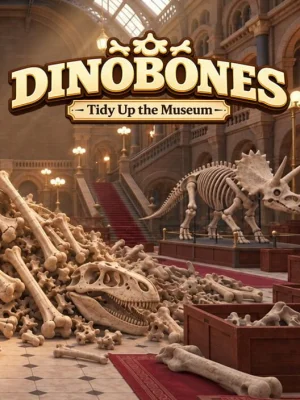
DinoBones Tidy Up the Museum is a relaxing museum restoration game where you and your cat have to deal with a huge number of scattered bones. After the incident, nine dinosaur skeletons were destroyed, and their parts scattered throughout the halls. You need to collect about 2000 bones, find out the purpose of each part and gradually return the skeletons to their original appearance.
Before starting work, the entire room looks as if there was a real defeat here. Overturned boxes scattered skulls, ribs and vertebrae across different parts of the museum, so you have to look literally everywhere for the necessary parts. Found bones cannot be immediately put into place: at first they have the status of unknown, and the player must determine which skeleton they correspond to. Features of appearance, color, texture and signs of wear help to distinguish them. Once identified, all that remains is to find a suitable position and assemble the exhibit gradually, bone by bone.
As work progresses, a feeling of true restoration emerges, since each completed skeleton noticeably changes the appearance of the museum. You can deal with the remaining drawers, open them, turn them over and clear the premises of all unnecessary things. Instead of the usual improvements, the player's own skill is used here: the more bones are collected, the easier it becomes to recognize the necessary details. Restoring exhibits also affects what's happening around you, unlocking special events with small rewards, toys, and unexpected finds that gradually make the museum more alive.
System Requirements
Minimum
- OS:
- 64-bit Windows 10
- Processor:
- Intel Core i7-4790K / AMD Ryzen 5 1500X
- RAM:
- 8 GB RAM
- Graphics:
- NVIDIA GeForce GTX 980 Ti 6 GB / AMD Radeon RX 6500 XT
- Storage:
- 4 GB available space
- DirectX:
- Version 11
Recommended
- OS:
- 64-bit Windows 11
- Processor:
- Intel Core i7-8700 / AMD Ryzen 5 3600
- RAM:
- 16 GB RAM
- Graphics:
- NVIDIA GeForce GTX 1080 / AMD Radeon RX 5700 XT
- Storage:
- 4 GB available space
- DirectX:
- Version 11
Installation Guide
Step-by-step setup process for Pre-installed (Portable)
-
No installation is needed — the game comes fully pre-installed and ready to play.
-
Extract the RAR / ZIP archive with WinRAR or 7-Zip into any folder, for example
C:\Games\GameName. -
Launch the game via
Run Me!.bat(or the main .exe file) inside the game folder.
Game Info
- Developer
- Indie Souls Studio
- Publisher
- Indie Souls Studio
- Platform
- PC (Windows)
- Release Date
- File Size
- 1.20 GB
- Status
- Pre-installed (Portable)
Download Game
Full game 6
09a1bf7d6b1bcb4f507896c463fc1ab0
0f4236f515215cfd87ae8b14474a88243cd5adc0abcf67d4e9c7d7658fa7c055
Checksums verify the integrity of this specific file. They are not an absolute malware guarantee — always scan downloaded files.
Torrent file ready
Reviews
No ratings yet.
No written reviews for this game yet.
Rate this repack in the form below and your comment becomes the first review here.





Comments (0)
No comments yet. Be the first to leave one!