Skip to content

FluxWerks

Early Access Sold as an unfinished build. Features, content and saves can still change before the full release.
FluxWerks
Platform
PC (Windows)
Release Date
File Size
329 MB
Views
17
Patch Notes
2
Comments
0
Languages
English
Added by

Play modes & compatibility

Play modes

  • Single-player
Download Game v0.5.15

Version Status

Current Version
v0.5.15
Current Build
25512180
Latest Build
25512180
Last Steam Update
Rate & review
No ratings yet.
Positive
85%
22

Screenshots

FluxWerks — Screenshots 1
FluxWerks — Screenshots 2
FluxWerks — Screenshots 3
FluxWerks — Screenshots 4
FluxWerks — Screenshots 5
FluxWerks — Screenshots 6
FluxWerks — Screenshots 7
FluxWerks — Screenshots 8

Description

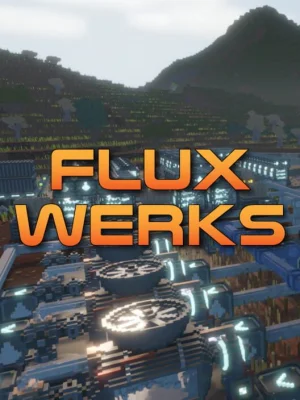
FluxWerks is an expansive industrial automation game where you take control of a flying robotic drone to establish massive automated factories on a mysterious alien planet. The core identity of this experience is built upon a fully destructible cube world where every single block of the landscape can be mined, tunneled through, or flattened to clear space for your expanding industrial layouts. Your main objective is to design complex logistical networks using conveyor belts, intricate pipes, and long range transport drones to harvest raw ores and process them into advanced technologies. Players gradually advance through an extensive research tree, transforming a simple starting furnace setup into a sprawling planetary manufacturing empire.

What makes the gameplay truly fascinating is the realistic simulation of thermal energy and fluid physics acting as both a resource and a dynamic hazard. Digging carelessly beneath a water body causes realistic flooding, while hot lava can block your cooling channels by hardening into solid stone upon contact with liquids. Advanced processing machines and large server clusters demand severe computing power and generate intense heat, forcing you to engineer elaborate cooling systems to prevent total system meltdowns. Additionally, the planet actively responds to your presence because aggressive weather conditions like blizzards and sandstorms wear down exposed machinery, and heavy industrial pollution might trigger a reaction from dormant threats hidden deep within the alien soil.

System Requirements

Minimum

OS:
Windows 10 64-bit
Processor:
Quad-core processor (e.g., Intel Core i5 / AMD Ryzen 5)
RAM:
16 GB RAM
Graphics:
NVIDIA GeForce GTX 1060 6GB / AMD Radeon RX 580
Storage:
1 GB available space
DirectX:
Version 11

Recommended

OS:
Windows 10/11 64-bit
Processor:
6-core processor or better (e.g., Intel Core i7 / AMD Ryzen 7)
RAM:
16 GB RAM
Graphics:
NVIDIA GeForce RTX 2060 / AMD Radeon RX 5700 XT or better
Storage:
1 GB available space
DirectX:
Version 12

Installation Guide

Step-by-step setup process for Pre-installed (Portable)

  1. No installation is needed — the game comes fully pre-installed and ready to play.

  2. Extract the RAR / ZIP archive with WinRAR or 7-Zip into any folder, for example C:\Games\GameName.

  3. Launch the game via Run Me!.bat (or the main .exe file) inside the game folder.

Game Info

Developer
Metallibitti Oy
Publisher
Metallibitti Oy
Platform
PC (Windows)
Release Date
File Size
329 MB
Status
Pre-installed (Portable)

Download Game

Full game 6

Download
FluxWerks
MD5: 32f9ebbd9ddb36a668c29203b635b2bd
SHA-256: 1704af97d8c5635c6087d3d6392c249e83bf26513b3c7be8dd93f809ab99515e

Checksums verify the integrity of this specific file. They are not an absolute malware guarantee — always scan downloaded files.

Torrent file ready

MEGA
Fluxwerks.Early.Access.zip
PIXELDRAIN
Fluxwerks.Early.Access.zip
GOFILE
Fluxwerks.Early.Access.zip
MEDIAFIRE
Fluxwerks.Early.Access.zip
1FICHIER
Fluxwerks.Early.Access.zip

Patch Notes

Official changelists for the builds of this game

v0.5.15 - Pump system rework and UX/Qol/Fixes

v0.5.15 Build 25512180

FluxWerks v0.5.15 - 24-09-2026

New Features
  • Pipe Flow - Select a pipe to see what fills it and what empties it and which side is the bottleneck.
Improvements
  • Crash Reports - The crash dump now starts ticked like every other attachment. You can still untick it before sending.
  • Pipe Colors - A pipe that empties and refills keeps its fluid color, and one that stays empty fades to gray over a few seconds instead of flickering.
  • Demolish Line and Network - Demolishing a whole belt line or pipe network now shows what it would remove first, and needs a longer hold on a second button.
  • Inspector Panels - Buttons and storage slots stay put as a pipe, belt or machine empties and refills, instead of disappearing and reappearing.
  • Fluid Pumps, Routers and Outputs - All three now move fluid ten times a second, and a short pipe between them no longer limits how much they move.
  • Building Overlays - A storage slot locked to an item now shows that item and its count above the building, even when the storage is empty.
  • Continue - Hovering the button shows which world and save it will load, and when that save was made.
  • Inserter Roofs - They fade out around the cursor while you lay belts or have the Demolish tool out.
  • Turning and Flipping Belts - Turning a placed belt with R or T, or flipping it, shows a label above it, or says why it can't.
  • Removing Belts and Pipes - Removing a belt or pipe tile now makes a sound, and a click that removes nothing says so.
  • Belt and Pipe Hints - The hint box now shows the key that stops placing.
  • Belt and Pipe Cursor - Over a placed belt or pipe the cursor is a gray outline box instead of the red used for blocked spots.
  • Direction Arrows - The belt and building direction arrows are now see-through outlines in the color of the preview.
  • Map Buildings - Buildings on the map now draw as a bright shape with a dark outline.
  • Display Settings - Exclusive Fullscreen and its Refresh Rate are removed, as Exclusive could freeze the game on launch. If it still does, add launch option -screen-fullscreen 0.
Bug Fixes
  • Fixed crash reports leaving out the game log and showing the wrong crash time.
  • Fixed one of two fluid machines sharing a pipe or tank doing nothing while the other moved everything.
  • Fixed a Fluid Output still under construction draining the pipe behind it.
  • Fixed a pump with a temperature limit taking fluid outside that limit from a tank holding both.
  • Fixed the contents shown above a storage disappearing and popping back as fluid passes through it.
  • Fixed Continue on the main menu sometimes loading an older save than the one made on leaving the game.
  • Fixed right-clicks made while the mouse is moving briefly turning the camera and jumping the cursor to the centre.
  • Fixed moving items to a full machine or a full inventory doing nothing, with no sound or message.
  • Fixed pipes laid side by side without joining being joined together after loading a save or replacing a pump.
  • Fixed areas of the world resetting to untouched terrain when antivirus or another program briefly used a game file.
  • Fixed the game sometimes crashing when switching to another window with Alt+Tab.
  • Fixed parallel belt lines placing fewer tracks than the preview showed when you were short on materials.
  • Fixed belt and pipe previews showing tiles as plans when the materials were in Cloud Storage.
  • Fixed the pipette key (V) picking the belt tool on an elevator's shaft, or a building behind a belt.
  • Fixed a Xenobloom site vanishing before it erupts when its ground is dug out or you travel far away.
Balance Changes
  • Excavator - Dig area width increased, MK 1 from 3 to 5 blocks and MK 2 from 6 to 7. Applies to newly placed excavators.
  • Machine Input and Output Slots - Now hold 10 crafts' worth of inputs instead of 3, and 20 crafts' worth of outputs instead of 10.

Source: Steam announcement SteamDB

16,000 Wishlists, thank you and release info

v0.5.14 Build 25437092

FluxWerks v0.5.14 - 21-09-2026

New Features
  • Nut, Rubber, Spruce and Mahogany Trees - Four new trees you can plant and farm. Spruce grows in the cold, Mahogany in mild grassland, Nut and Rubber in the jungle.
  • Fern - A new jungle plant that yields biomass and no seeds. A Planter sows it from one seed, turning spare seeds into biomass.
  • Orbit Toggle - Hold the camera orbit button and the camera keeps orbiting after you let go, until you press it again or Escape. Turn it on in Settings under Camera.
  • Pipe To Pipe Pumps - A Fluid Pump placed between two pipes now moves fluid from one to the other. A pump with the same pipe on both sides shows a warning.
  • Pump Temperature Filter - A Fluid Pump can now be limited to fluid above, below or between temperatures you set. Select the pump and press the thermometer button over it.
Improvements
  • Crash Reports - A crash report now offers the game log and system info as attachments.
  • Mine Tool - Marking a block under a tree now harvests the tree first, then mines the block. Buildings and planted crops are still refused.
  • Area Tools - Marking an area now tints what it will affect while you drag, red when the action will destroy it.
  • Materials Bar - The queued button and missing materials now stay visible while the bar is collapsed.
  • Work Orders - Marked work pauses when you move far away and resumes when you return. Going much further, or fast travelling, cancels it. Construction is unaffected.
  • Blueprints - Terrain work from blueprints, and nanobot repairs, now stop when you move far away and start again when you return.
  • Reach - The edge of your reach now shows on the ground near the cursor when you aim a tool or building close to it.
  • Wiki - Long section and page names in the category list now fit on one line.
  • Belt Corners - Turning while chaining belts now turns the last tile you placed, instead of adding one more tile before the corner.
  • Fluid Pumps - A pump now works whichever way round it is placed, only its arrow matters.
  • Planter - The plot grid now shows on the ground while placing or selecting a Planter. Where two Planters overlap, each plot belongs to one of them.
Bug Fixes
  • Fixed dry grassland having no plants at all across large areas.
  • Fixed mining drills, pumps and planters quietly stopping after you moved away from them.
  • Fixed machines running hotter, and wind and solar output changing, while you were far away from them.
  • Fixed blueprint work never finishing under buildings that need no ground.
  • Fixed auto-route never building a two-block belt around a corner, jumping from one block to three.
  • Fixed the belt preview flickering between two directions when aiming diagonally off an existing belt.
  • Fixed the wiki's category list jumping back to where it was whenever you scrolled it.
  • Fixed nanobots working blocks that a machine had already cleared, taking the full time for no resources.
  • Fixed area tools marking blocks, and removing belts and pipes, beyond your reach.
  • Fixed belts and pipes being built, removed, rotated and flipped from beyond your reach, while buildings there were refused.
  • Fixed long planned belts and pipes not building until you flew back to where they start.
  • Fixed Area Select tinting a whole belt or pipe when its box covered only part of it.
  • Fixed a Planter's crops sitting against one edge of its area with an empty strip along the other.
  • Fixed a Planter whose field is full and growing showing a warning icon and a red status.
Balance Changes
  • Kapok Tree - Now takes one plot instead of four, and grows in 40 minutes instead of 10. Planted Kapoks are smaller than wild ones.
  • Volcanic Regions - Now cover three times as much of the world. Each is about 300 to 500 blocks across, up from 240 to 400.
  • Sulfur - Each sulfur block now holds 20 instead of 10, and volcanic regions have more sulfur deposits.

Source: Steam announcement SteamDB

Reviews

0.0
out of 5
0 ratings

No ratings yet.

No written reviews for this game yet.

Rate this repack in the form below and your comment becomes the first review here.

Comments (0)

No comments yet. Be the first to leave one!

Leave a Comment

Rate this game
0 / 1000

Add a rating and your comment is published as a review too.

Please follow our community standards. Read the community rules

Similar Games