My Dream Setup Build 21663024 (upd.30.01.2026) + all DLC - TENOKE

About The Game
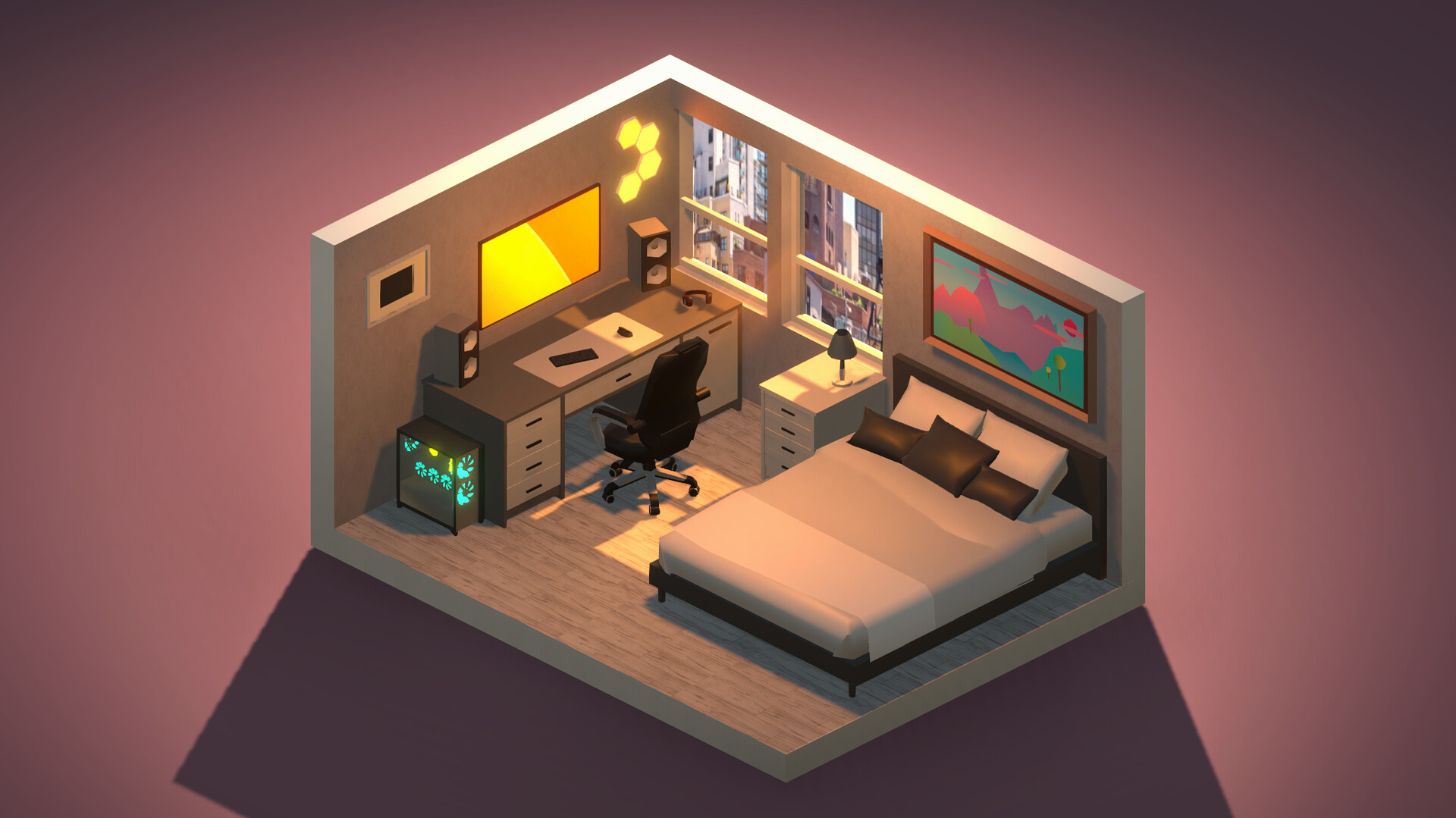
My Dream Setup is a simulation game about building the room you’ve always dreamed of. A huge selection of furniture, computers and their accessories, posters, paintings, plants and other interior details awaits you. Try them all and create your dream installation. Want to create the installation of your dreams. In My Dream Setup, you can create any setup you want. Any color combination, any budget and any purpose. You can create anything you want. Arrange the furniture as you like. No placement on the grid — complete freedom of action. If you don’t like where you put a piece of furniture, just move it anytime. There is no limit to the amount of furniture in the room. It’s up to you to make a small neat office or a huge studio with a bunch of computers. Change the color of the furniture.
NOTE. Uploaded version: 01 November 2025 [Update v20251030 Build 20604374 + all DLC] + Update v20260127 / Build 21663024. This is Full Release and latest version of game. The game is already Packaged in ISO File and ready to run the game after install, read the instruction below.
The following DLCs are included:
- My Dream Setup — Pets DLC
- My Dream Setup — Bathroom DLC
- My Dream Setup — Kitchen DLC
- My Dream Setup — Garage DLC
- My Dream Setup — Sim Racing DLC
Game Details
- Title: My Dream Setup
- Genre: Casual, Indie, Simulation
- Developer: Campfire Studio
- Publisher: Campfire Studio
- Release year: 2023
- Available Languages: English, French, German, Spanish - Spain, Ukrainian
- Release Name: My.Dream.Setup.Sim.Racing-TENOKE + Update v20260127 / Build 21663024
- Game Version: Build 21663024 (upd.30.01.2026) + all DLC
- Game Releaser: TENOKE
- Size: 2.45 GB
Full Description
All RGB colors are available. Each piece of furniture is made separately. This allows you to create various color combinations. Almost everything can be painted: doors, windows, furniture and background color. Try to combine different colors and shades to get the best look of the room. A huge selection of wallpapers and wall paints awaits you. Do you want to paste wallpaper with flowers in your room? Are you a loft fan and want a brick wall? Paint each wall individually to create an unexpected design, or paint an entire room with one click. We give free rein to your imagination. See how your room looks in different lighting and weather conditions.
We offer you five weather options: sunny, sunset, rain, snow and night. Each option gives the room a new atmosphere, as well as a new view from the window. Also, in rainy and snowy weather, precipitation appears on the windows for even greater immersion. My Dream Setup offers you the opportunity to design a room that you will furnish yourself. Use Blueprint mode to place walls, windows, and doors. You can redecorate the room at any moment, even if you have already started decorating it.
Key Features
- Relaxing, engaging, and highly varied gameplay, limited only by your imagination.
- Huge selection of furniture, computers and their accessories, posters, pictures, plants and other interior details.
- Ability to share your rooms on Twitter right from the game.
- Cozy atmosphere.
- RGB lighting.
System Requirements
MINIMUM:
Requires a 64-bit processor and operating system
OS: Win10 64-bits Version 21H2
Processor: Intel i7-6700 or AMD Ryzen5 1500X or faster processor
Memory: 8 GB RAM
Graphics: Nvidia GTX960 4GB or AMD 380X 4GB or Higher
DirectX: Version 12
Storage: 3 GB available space
Additional Notes: AMD FSR 2.0 Supported
RECOMMENDED:
Requires a 64-bit processor and operating system
OS: Win10 64-bits Version 21H2
Processor: Intel i7-9700 or AMD Ryzen5 2600X or faster processor
Memory: 16 GB RAM
Graphics: Nvidia RTX2060 8GB or AMD 5700 8GB or Higher
DirectX: Version 12
Storage: 3 GB available space
Additional Notes: AMD FSR 2.0 Supported
Screenshots


Video
How to Install
1. The first thing we do is download the game’s installation files.
2. Unzip the archive to the hard disk.
3. Mount or burn the ISO image in the disk emulator (UltraISO program).
4. After mount ISO, go to the folder and run the file «setup.exe».
5. During the installation, we specify the location on the disk where we want to install it.
6. Copy the contents of the folder «CRACK» in the folder with the game.
7. Download and install Update v20260127, in game folder.
8. Launch the game!
Download update only: My.Dream.Setup.Sim.Racing.Update.v20260127-TENOKE, MIRROR [ 36.6 MB ]
- Extract.
- Run setup.exe and install the update.
- Copy crack to install dir.
- Play!
Download update only: My.Dream.Setup.Placement.Update.v20250823-TENOKE, MIRROR, MIRROR 2 [ 161.5 MB ]
Download update only: My.Dream.Setup.Placement.Update.v20250716-TENOKE, MIRROR, MIRROR 2 [ 148.5 MB ]
Download update only: My.Dream.Setup.Complete.Edition.Update.v20250520-TENOKE [ 240.5 MB ]
Download update only: My.Dream.Setup.Complete.Edition.Update.v20250407-TENOKE [ 162.2 MB ]
Download update only: My.Dream.Setup.Complete.Edition.Update.v20250302-TENOKE [ 170.1 MB ]
Download update only: My.Dream.Setup.Complete.Edition.Update.v20250107-TENOKE [ 282.8 MB ]
Download update only: My.Dream.Setup.Pets.Update.v20240929-TENOKE [ 38.8 MB ]
Download update only: My.Dream.Setup.Pets.Update.v20240908-TENOKE [ 133.8 MB ]
Download update only: My.Dream.Setup.Pets.Update.v20240727-TENOKE [ 253.1 MB ]
Download update only: My.Dream.Setup.Pets.Update.v20240530-TENOKE [ 654.65 MB ]
Download update only: My.Dream.Setup.Pets.Update.v20240411-TENOKE [ 1.1 GB ]
Download update only: My.Dream.Setup.Pets.Update.v20240224-TENOKE [ 841.9 MB ]
Download update only: My.Dream.Setup.Pets.Update.v20240113-TENOKE [ 557.8 MB ]
Download update only: My.Dream.Setup.Pets.Update.v20240106-TENOKE [ 693.7 MB ]
Download update only: My.Dream.Setup.Update.v20230718-TENOKE [ 223.7 MB ]
Download update only: My.Dream.Setup.Update.v20230711-TENOKE [ 483.1 MB ]
Download update only: My.Dream.Setup.Update.v20230701-TENOKE [ 369.5 MB ]
Download update only: My.Dream.Setup.Update.v20230604-TENOKE [ 356.1 MB ]
Download update only: My.Dream.Setup.Update.v20230521-TENOKE [ 264.2 MB ]
Download update only: My.Dream.Setup.Update.v20230422-TENOKE [ 297.7 MB ]
Download update only: My.Dream.Setup.Update.v20230224-TENOKE [ 244 MB ]
Download My Dream Setup Build 21663024 (upd.30.01.2026) + all DLC — TENOKE
Alternative Download Links
Alternative Mirrors
Other Versions & DLCs
Game Update History
- My Dream Setup v20251030 → Update v20260127 / Build 21663024 [ 30.01.2026 ]
- My Dream Setup v20250823 → Update v20251030 Build 20604374 [ 01.10.2025 ]
- My Dream Setup v20250716 → Update v20250823 [ 03.09.2025 ]
- My Dream Setup v20250607 → Placement v20250716 [ 27.07.2025 ]
- My Dream Setup v20250520 → Placement v20250607 Build 18776378 [ 11.06.2025 ]
- My Dream Setup v20250407 → Update v20250520 [ 23.05.2025 ]
- My Dream Setup Build 17563724 → Update v20250407 [ 16.04.2025 ]
- My Dream Setup Build 16927431 → Update v20250302 Build 17563724 [ 11.03.2025 ]
- My Dream Setup Build 16575801 → Update v20250107 Build 16927431 [ 27.01.2025 ]
- My Dream Setup → Complete Edition Update v20241129 Build 16575801 + Garage DLC [ 02.12.2024 ]
- My Dream Setup Build 15865609 → Update v20241012 Build 16019053 [ 17.10.2024 ]
- My Dream Setup Build 15630528 → Update v20240929 Build 15865609 [ 02.10.2024 ]
- My Dream Setup v20240727 → Update v20240908 Build 15630528 [ 11.09.2024 ]
- My Dream Setup Build 14043232 → Update v20240727 [ 29.07.2024 ]
- My Dream Setup Build 14027370 → Build 14043232 [ 22.04.2024 ]
- My Dream Setup Build 13551971 → Update v20240411 (Build 14027370) [ 13.04.2024 ]
- My Dream Setup Build 13163809 → Update v20240224 (Build 13551971) [ 26.02.2024 ]
- My Dream Setup v20240106 → Update v20240113 (Build 13163809) [ 15.01.2024 ]
- My Dream Setup Build 12748938 → Update v20240106 [ 08.01.2024 ]
- My Dream Setup 11866207 → Build 12748938 (Pets DLC) [ 21.11.2023 ]
- My Dream Setup v20230718 → Build 11866207 [ 22.08.2023 ]
- My Dream Setup v20230711 → Update v20230718 [ 20.07.2023 ]
- My Dream Setup v20230701 → Update v20230711 [ 13.07.2023 ]
- My Dream Setup v20230604 → Update v20230701 [ 06.07.2023 ]
- My Dream Setup v20230521 → Update v20230604 [ 06.06.2023 ]
- My Dream Setup v1.0 Build 10592180 → Update v20230521 [ 23.05.2023 ]
- My Dream Setup → v1.0 Build 10592180 [ 21.02.2023 ]