Bus Mechanic Simulator v1.1.3 (upd.22.07.2020) - CODEX
CODEX Full gameFree DownloadLatest version Torrent File
Game updated on 22-07-2020, 12:24. Current version: v1.1.3 (upd.22.07.2020).
About The Game
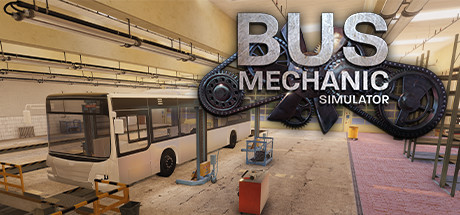
Bus Mechanic Simulator — indie, simulator, casual game from the studios VIS-Games and Darius Bode. In the video game, we will try to find out our abilities, in the role of an experienced auto mechanic, repairing passenger buses of the well-known MAN brand. We will repair the suspension, engines, electrical equipment and other parts and mechanisms. This is a simulator game developed by VIS-Games for the PC platform. The environment in the game belongs to the style of modernity, simulator, casual game, indie, relaxing, physics, realism, for one player, replayability, management, steam achievements and others.
Game Details
- Title: Bus Mechanic Simulator
- Genre: Casual, Indie, Simulation
- Developer: VIS-Games, Darius Bode
- Publisher: Aerosoft GmbH
- Release year: 2020
- Available Languages: English, German, French, Spanish - Spain, Polish, Portuguese
- Release Name: Bus.Mechanic.Simulator-CODEX
- Game Version: v1.1.3 (upd.22.07.2020)
- Game Releaser: CODEX
- Size: 3.90 GB
Full Description
Roll up your sleeves and boldly take up your favorite business, faced with unique views of the bus world. The task may not always seem easy for you, which is why you should always improve your skills. Events send you to the expanses of the city of Hamburg, where your so-called workshop is located. Here you will spend most of the time trying to complete the mission correctly and efficiently. The garage is equipped with two repair stations at once, which will allow to fulfill orders twice as fast. There are more than enough tools, use each correctly and then you will definitely be able to achieve a positive result by sending buses on a long journey.
Key Features
- Bus garage (modeled on the basis of an original bus garage in Hamburg).
- Two repair stations for service buses.
- A repair station for articulated buses.
- Separated test stand for brakes and shock absorbers (need to be unlocked).
- Countless tools to maintain and repair the buses.
- 3 bus models: service bus, articulated bus, double-decker bus.
- Over 2000 interactive elements / components.
- Maintenance and repairs of axles / wheels, power unit, heating / air conditioning, interior and electrical systems.
System Requirements
MINIMUM:
Requires a 64-bit processor and operating systemOS: Win 7/8.1/10 (64Bit)
Processor: AMD / Intel dual-core (with hyper-threading) CPU, running at 3 GHz (Intel Core i5-3000 series or newer architectures are recommended)
Memory: 6 GB RAM
Graphics: AMD/NVIDIA dedicated graphic card, with at least 2048MB of dedicated VRAM and Shader Model 5.1 support. AMD R7 265 and NVIDIA GeForce GTX 950 Ti or newer architectures are recommended.
DirectX: Version 11
Storage: 4 GB available space
Sound Card: Integrated or dedicated DirectX 9 compatible soundcard
Additional Notes: Keyboard, mouse and internet connection for Steam
RECOMMENDED:
Requires a 64-bit processor and operating system
OS: Win 10 (64Bit)
Processor: AMD / Intel quad-core processor running at 3.5 GHz (Intel Core i7 series or newer architectures are recommended)
Memory: 8 GB RAM
Graphics: AMD/NVIDIA dedicated graphic card, with at least 4096MB of dedicated VRAM (or more) and Shader Model 5.1 support. ATI/AMD Radeon HD 7870 and NVIDIA GeForce GTX 1050 Ti or newer architectures are recommended.
DirectX: Version 11
Storage: 4 GB available space
Sound Card: Integrated or dedicated DirectX 9 compatible soundcard
Additional Notes: Keyboard, mouse and internet connection for Steam
Screenshots


Video
How to Install
1. The first thing we do is download the game’s installation files.
2. Mount or burn the ISO image in the disk emulator (UltraISO program).
3. During the installation, we specify the location on the disk where we want to install it.
4. Wait until the installation process is complete, a shortcut will appear on the desktop.
5. Download & install Update v1.0.5 / v1.1.0 / v1.1.2 / v1.1.3, in game folder.
6. Copy the contents of the folder «CODEX» in the folder with the game.
7. Start the game.
Download update only: Bus.Mechanic.Simulator.Update.v1.1.3-CODEX [ 695.3 MB ]
Download update only: Bus.Mechanic.Simulator.Update.v1.1.2-CODEX [ 195.2 MB ]
Download update only: Bus.Mechanic.Simulator.Update.v1.1.0-CODEX [ 181.2 MB ]
Download update only: Bus.Mechanic.Simulator.Update.v1.0.5-CODEX [ 43.3 MB ]
Download update only: Bus.Mechanic.Simulator.Update.v1.0.2-CODEX [ 34.9 MB ]
2. Mount or burn the ISO image in the disk emulator (UltraISO program).
3. During the installation, we specify the location on the disk where we want to install it.
4. Wait until the installation process is complete, a shortcut will appear on the desktop.
5. Download & install Update v1.0.5 / v1.1.0 / v1.1.2 / v1.1.3, in game folder.
6. Copy the contents of the folder «CODEX» in the folder with the game.
7. Start the game.
Download update only: Bus.Mechanic.Simulator.Update.v1.1.3-CODEX [ 695.3 MB ]
Download update only: Bus.Mechanic.Simulator.Update.v1.1.2-CODEX [ 195.2 MB ]
Download update only: Bus.Mechanic.Simulator.Update.v1.1.0-CODEX [ 181.2 MB ]
Download update only: Bus.Mechanic.Simulator.Update.v1.0.5-CODEX [ 43.3 MB ]
Download update only: Bus.Mechanic.Simulator.Update.v1.0.2-CODEX [ 34.9 MB ]
Download Bus Mechanic Simulator v1.1.3 (upd.22.07.2020) — CODEX
File Size: 3.90 GB
How to get your file — 3 quick steps
VPN detected. Our download does not accept VPN connections. Please disable your VPN to continue.
Re-check
1
Click download
Use any button below
2
Install Opera
On the page that opens
Switch to the tab that just opened — Opera installer is already there. After install, open this page in Opera and click Check install.
Opera not detected. Make sure it's installed and open this page in Opera browser, then click Check install again.
Opera is a free, official browser by Opera Software AS — safe to install. [ Opera Install Guide ]
Alternative Download Links
Alternative Mirrors
Searching mirrors…
Game Update History
- Bus Mechanic Simulator v1.1.2 → v1.1.3 [ 22.07.2020 ]
- Bus Mechanic Simulator v1.1.0 → v1.1.2 [ 14.07.2020 ]
- Bus Mechanic Simulator v1.0.5 → v1.1.0 [ 20.06.2020 ]
- Bus Mechanic Simulator v1.0.2 → v1.0.5 [ 20.05.2020 ]
- Bus Mechanic Simulator v1.0 → v1.0.2 [ 15.05.2020 ]
- Bus Mechanic Simulator → v1.0 [ 13.05.2020 ]