MARVEL vs CAPCOM Fighting Collection Arcade Classics v1.0.0.4 (upd.13.06.2025) - RUNE

About The Game
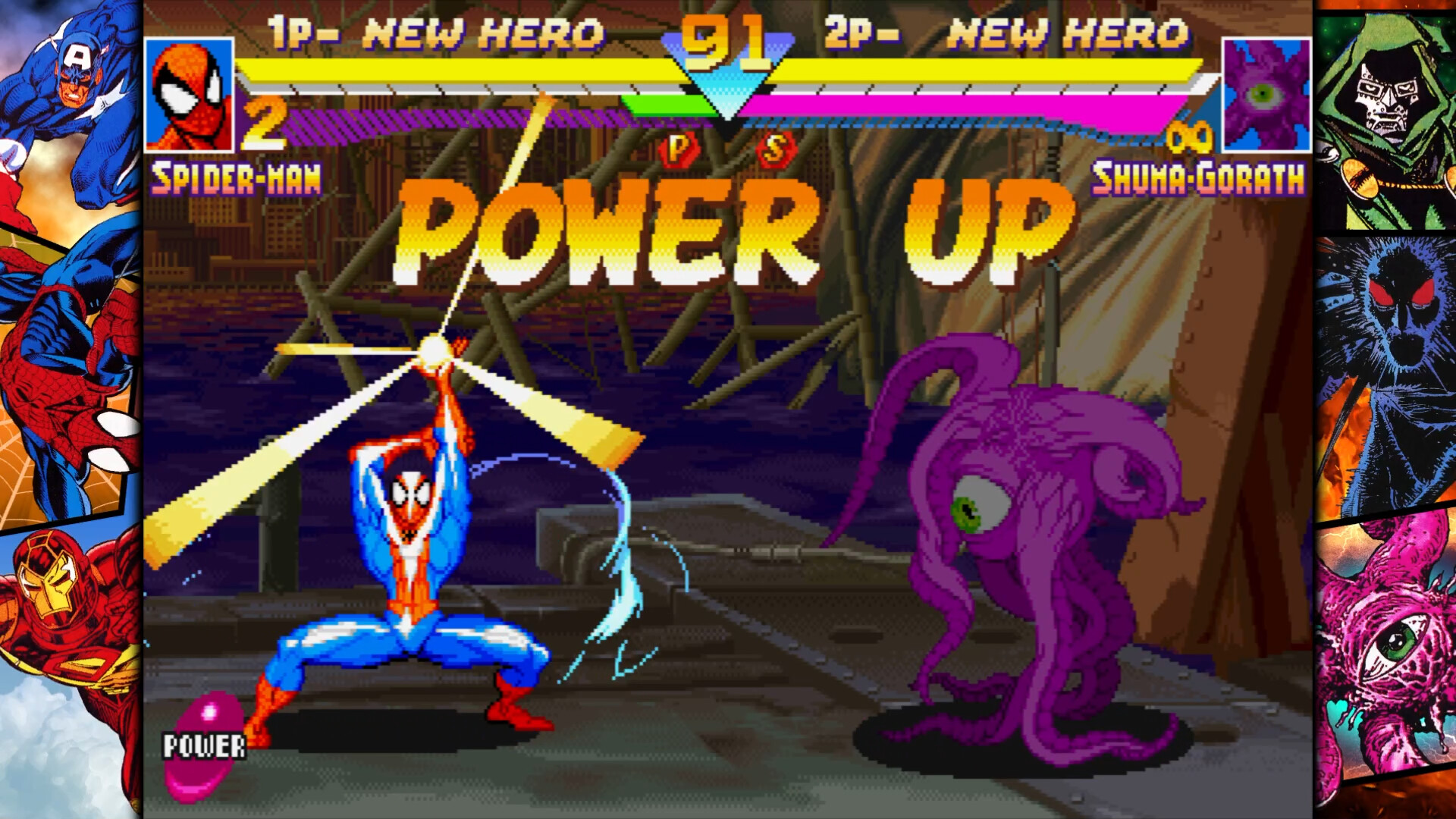
MARVEL vs CAPCOM Fighting Collection Arcade Classics is a compilation of classic fighting games that brings together popular entries from the famous series. The collection includes a mix of games featuring iconic characters from the Marvel and Capcom universes. The project has a variety of modes and features, allowing you to immerse yourself in arcade battles and enjoy the gameplay. This collection includes several games, each of which brings unique elements and characters. The gamer participates in dynamic strategic battles, choosing a team of characters from a list that includes famous heroes and villains from both franchises.
The process emphasizes the execution of combos and special moves, offering a variety of rules and mechanics for each entry. Both single-player modes against AI and multiplayer battles are provided, allowing you to play with other participants. Each entry in this collection retains its unique atmosphere and difficulty, providing a nostalgic experience for dedicated fans and remaining accessible to newcomers. There are also additional features such as training modes and online options that enhance the overall experience. This collection offers a wide range of gaming options: you can choose your favorite characters from the Marvel and Capcom universes, engage in strategic battles using unique moves and combos, use special abilities and super moves to achieve victory.
NOTE. Uploaded version: 12 September 2024 [Build 15598301] + Update v1.0.0.4 (upd.13.06.2025). This is Full Release and latest version of game. The game is already Packaged in ISO File and ready to run the game after install, read the instruction below.
Included Games:
- X-MEN CHILDREN OF THE ATOM
- MARVEL SUPER HEROES
- X-MEN VS. STREET FIGHTER
- MARVEL SUPER HEROES vs. STREET FIGHTER
- MARVEL vs. CAPCOM CLASH OF SUPER HEROES
- MARVEL vs. CAPCOM 2 New Age of Heroes
- THE PUNISHER
Game Details
- Title: MARVEL vs CAPCOM Fighting Collection Arcade Classics
- Genre: Action
- Developer: CAPCOM Co
- Publisher: CAPCOM Co
- Release year: 2024
- Available Languages: English, French, Italian, German, Spanish - Spain, Arabic, Spanish - Latin America, Portuguese - Brazil, Polish, Russian, Simplified Chinese, Traditional Chinese, Japanese, Korean
- Release Name: MARVEL.vs.CAPCOM.Fighting.Collection.Arcade.Classics-RUNE + Update v1.0.0.4
- Game Version: v1.0.0.4 (upd.13.06.2025)
- Game Releaser: RUNE
- Size: 3.75 GB
System Requirements
Minimum:
Requires a 64-bit processor and operating system
OS: Windows10 (64-BIT Required) / Windows11 (64-BIT Required)
Processor: IntelⓇ Core™ i5-3470, AMD FX-6100
Memory: 4 GB RAM
Graphics: NVIDIA®: GeForce® GTX 470 with 1.2GB Video RAM, AMD: Radeon™ R7 260x with 2GB Video RAM
DirectX: Version 11
Network: Broadband Internet connection
Storage: 4 GB available space
Sound Card: DirectSound (DirectX® 9.0c or later)
Additional Notes: Xinput compatible controller recommended
Recommended:
Requires a 64-bit processor and operating system
OS: Windows10 (64-BIT Required) / Windows11 (64-BIT Required)
Processor: IntelⓇ Core™ i5-4460, AMD FX-8300 (or better)
Memory: 4 GB RAM
Graphics: NVIDIA®: GeForce® GTX 970 with 4GB Video RAM, AMD: Radeon™ RX480 with 4GB Video RAM
DirectX: Version 11
Network: Broadband Internet connection
Storage: 4 GB available space
Sound Card: DirectSound (DirectX® 9.0c or later)
Additional Notes: Xinput compatible controller recommended
Screenshots


Video
How to Install
1. The first thing we do is download the game’s installation files.
2. Mount or burn the ISO image in the disk emulator (UltraISO program).
3. During the installation, we specify the location on the disk where we want to install it.
4. Wait until the installation process is complete, a shortcut will appear on the desktop.
5. Copy the contents of the folder «RUNE» in the folder with the game.
6. Download and install Update v1.0.0.2 + Update v1.0.0.4, in game folder.
7. Start the game.
Download update only: MARVEL.vs.CAPCOM.Fighting.Collection.Arcade.Classics.Update.v1.0.0.4-RUNE [ 126.4 MB ]
-
Extract.
-
Run setup.exe and install the update.
- Copy crack from RUNE dir to install dir.
-
Play!
Download update only: MARVEL.vs.CAPCOM.Fighting.Collection.Arcade.Classics.Update.v1.0.0.2-RUNE [ 32 MB ]
Download MARVEL vs CAPCOM Fighting Collection Arcade Classics v1.0.0.4 (upd.13.06.2025) — RUNE
Alternative Download Links
Alternative Mirrors
Other Versions & DLCs
Game Update History
- MARVEL vs CAPCOM Fighting Collection Arcade Classics v1.0.0.2 → Update v1.0.0.4 [ 13.06.2025 ]
- MARVEL vs CAPCOM Fighting Collection Arcade Classics Build 15598301 → Update v1.0.0.2 [ 21.09.2024 ]
- MARVEL vs CAPCOM Fighting Collection Arcade Classics → Build 15598301 [ 12.09.2024 ]